- R1D2 radar sensor for mobile applications
- Setup and support
Optimize your R1D2 radar ground speed sensor installation
Thank you for your purchase of an R1D narrow beam radar sensor. On the following pages, you will find information to help you install and program the sensor as well as answers to frequently asked questions.
Should you need additional support, feel free to contact our service center at 800-441-8246 and speak to one of our applications engineers.
For best performance of the R1D family, please adhere to the installation and configuration guidelines.
This product does not have a functional safety certificate. Do not use in hazardous areas.
- Large metallic objects in the immediate vicinity of the sensing face can interfere with the signal.
- Ensure there are no unwanted objects in the sensor's field of view.
For ground speed measurement

Mounting set E23009
For reliable ground speed measurement, the radar ground speed sensor must be mounted at a angle. Mounting perpendicular to the ground will not provide the correct evaluation of the Doppler shift.
- Fully adjustable mounting
- Tilting angle up to 45º
- Additional mechanical device protection
For level measurement

Mounting set E23010
For accurate and reliable level measuring applications, the sensing face must be as perpendicular to the surface as possible. This provides maximum reflection of the radar wave.
- Fully adjustable mounting
- Tilting angle up to 20 º
- Additional mechanical device protection

Coordinate system
The R1D sensor has an integrated inclination measurement device. It recognizes its own installation angles and outputs the information when needed.
- Tilting around the x-axis is called "rolling"
- Tilting around the y-axis is called "pitching"
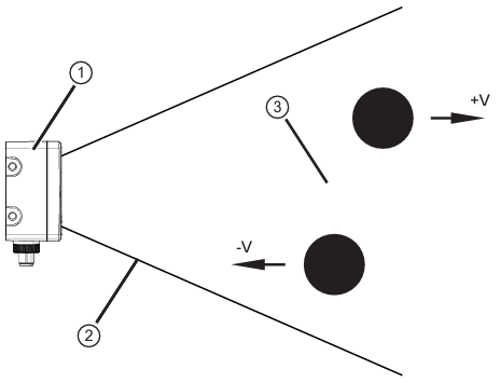
Velocity measurement
The sensor detects moving targes and can determine their speed and direction using the Doppler effect. An object moving away from the sensing face is considered moving with positive velocity (+v). An object moving toward the sensing face is considered moving with negative velocity (-v).
- Sensor
- Detection range
- Moving objects
