- OGD laser distance sensor
- Setup and support
OGD laser distance sensor: Installation guidelines
Thank you for your purchase of an OGD laser distance sensor. On the following pages, you will find information to help you install and program the sensor as well as answers to frequently asked questions.
Should you need additional support, feel free to contact our service center at 800-441-8246 and speak to one of our applications engineers.
For best performance of the OGD family of laser distance sensors, please adhere to the installation guidelines.
Operating zones
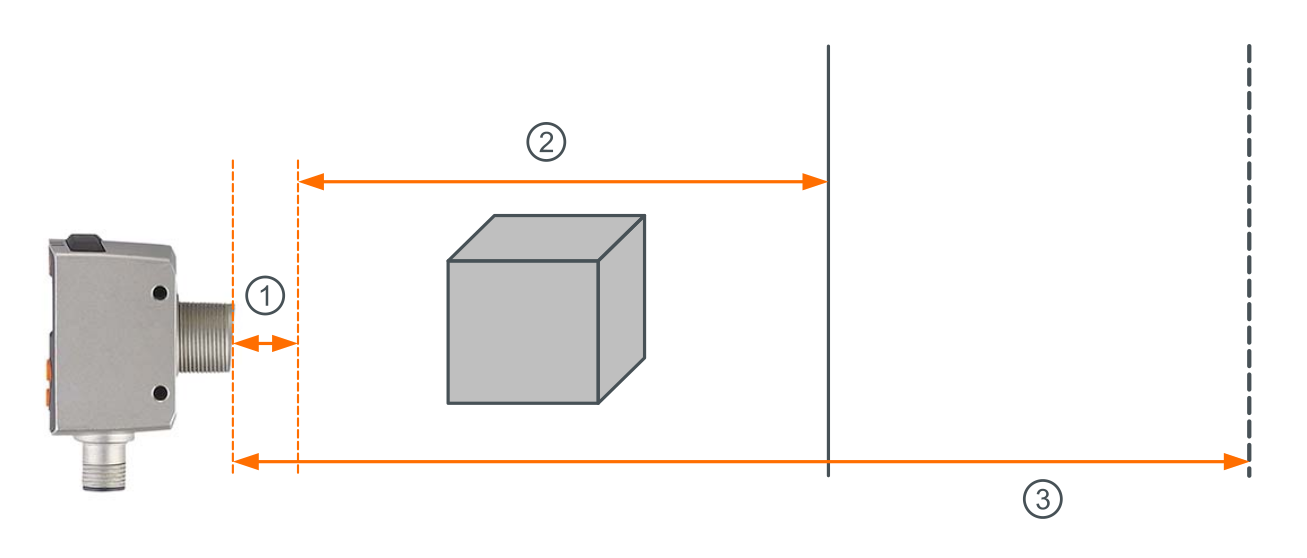
The OGD sensors have three zones to keep in mind as shown in the image below. Different part numbers within the family will have different specifications for these zones. Please refer to individual datasheets for details.
- Blind zone – because of the time of flight technology, a minimum distance between the sensor face and target is required for accurate detection. If an object is detected within this zone, “near” will be shown on the sensor display.
- Measuring zone – the distance where target detection is guaranteed at the accuracy specified on the datasheet. Note accuracy can vary by target color and distance as shown on the datasheet.
- Background suppression zone – the distance beyond the measuring zone where reflections from objects are ignored by the sensor. The operating instructions refer to this zone as the “unambiguity range”.
Accessories
The unit is supplied without mounting accessories, but the following are the most popular. Additional accessories can be found with the product datasheet.
Browse all ifm laser distance sensors.