Track the pulse of your plant with moneo
The asset monitoring starter kit is designed to help you fast-track a proof-of-concept application in your plant.
The starter kit includes a vibration sensor that can help you reduce unplanned downtime on assets like motors, pumps, and fans in three simple steps:
Start your IIoT journey and
improve operational efficiency by:

Improving
asset health
Prevent unplanned downtime by predicting failures and increasing machine availability.

Maintaining
process quality
Improve your process performance by monitoring and detecting deviations in real time.

Optimizing energy consumption
Reduce operating costs by monitoring energy consumption at machine level.

Select the right asset
Choose equipment that will clearly demonstrate value during your predictive maintenance (PdM) proof of concept.
-
Avoid highly critical assets — they often fail too infrequently during a pilot.
-
Instead, choose equipment with:
-
Known failure patterns
-
Higher frequency of issues
-
Lower repair cost and complexity
-
Smaller or non-critical machines are ideal because they:
-
Provide more opportunities to detect faults
-
Allow faster validation of predictions
-
Encourage quicker maintenance response
Mount the vibration sensor
For rotating equipment such as pumps and motors, proper placement is critical for accurate data.
Mount sensors:
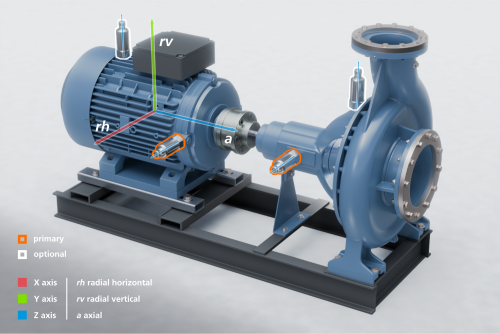
- On both sides of the shaft coupling
- Radially to the shaft rotation
- As close to the bearing housing as possible
This positioning ensures the strongest vibration signal and best fault detection.
Recommended locations:
- Motor bearing housing
- Pump bearing housing
In the image to the right, the primary mounting locations are shown as orange-highlighted VVB sensors on the motor and pump bearing housings.
Optional (for larger assets):
- Non-drive end (NDE) of motor or pump for additional coverage
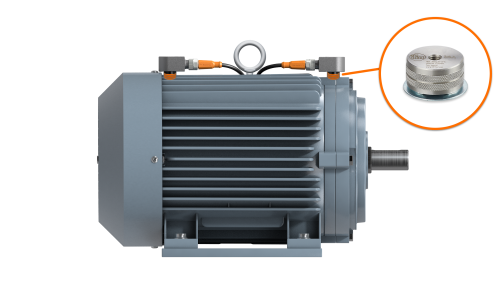
Use the magnetic mount (temporary placement)
Before permanent installation:
-
Attach the VVB sensor to the magnetic mount using the supplied M8 set screw
-
Place the sensor on the bearing housing
-
Test and confirm the optimal mounting location
Once confirmed, proceed with permanent mounting if required.
Wire the io-key
Power the device:
-
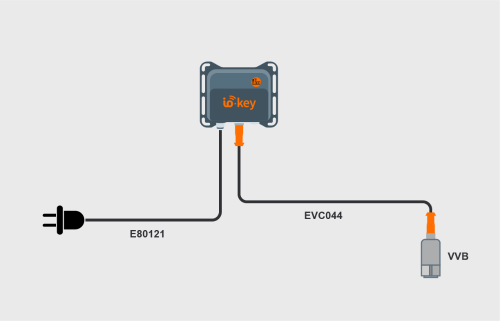
Connect the M12 female connector (E80121) to the power port on the io-key
-
Plug the E80121 into a standard wall outlet
This provides quick and simple power for a proof of concept setup.
Connect the vibration sensor:
-
The io-key supports up to 2 sensors
-
Connect the sensor using an EVC044 patch cord
-
Plug it into either IO-Link port on the io-key
Click demo: create new self-service mobile IoT suite (self-service) user
Click demo: create new moneo Cloud instance with mobile IoT suite