- IO-Link — main page
- Device configuration
Configuring IO-Link devices with moneo configure free

moneo configure free is ifm’s free solution for configuring IO-Link products. With its intuitive user interface, this tool simplifies device configuration and significantly reduces machine commissioning times.

Ready to use instantly – wherever you are
- No installation required (provided PCAP is present)
- Use without login or licensing
- Ideal for environments with strict IT policies and for minimal effort

Parameter setting for all IO-Link devices
- Automatic detection of all IO-Link devices connected in the network, as well as manufacturer-independent support in accordance with IO-Link specifications
- Configuration of and access to parameters for all IO-Link devices
- Read, write and modify device parameters online and offline

Visualisation
- Clear visualisation of process data on dashboards
- Quick display of real-time data from IO-Link sensors and devices
- Display of short-term trend curves

IODD management
- Display local and online IODD catalogues
- Updates
- Import IODD files

Bulk operations
- Simultaneous firmware updates for multiple ifm IoT and IO-Link devices
- Central security settings in a single step
- Significant time savings in large networks
Connecting devices to moneo configure free
With moneo configure free, IO-Link devices can be configured via both USB and Ethernet. Both methods are demonstrated here.
Connection via USB IO-Link interface AL1060
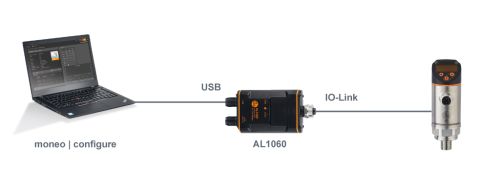

Advantages
- Power supply of the sensors via USB (cable included with ZZ1060)
- Compact and easy to transport

Disadvantages
- Only one device can be connected at a time
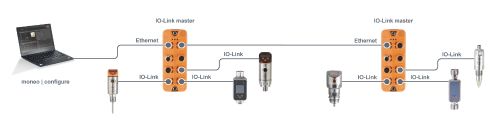
Advantages
- Simultaneous connection to multiple masters and devices
- Device access without modifying / interrupting the existing communication with the PLC
Disadvantages
- A separate 24 V DC supply is required for the IO-Link masters


