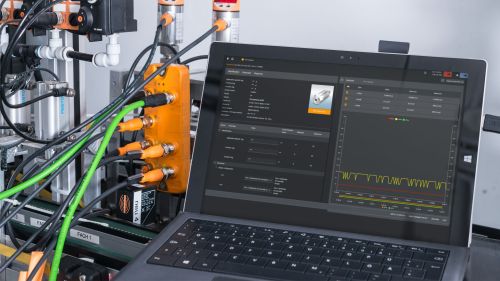
ifm IO-Link masters
ifm's extensive IO-Link master portfolio is divided into the 4 product categories CabinetLine, PerformanceLine, DataLine and SolutionBlock.
Each category offers different advantages for your application and requirement. Learn more about the differences in power supply, bus systems, IT connection and other features below.
DataLine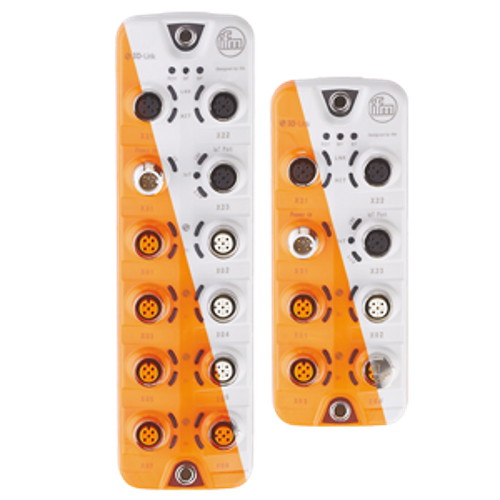 |
PerformanceLine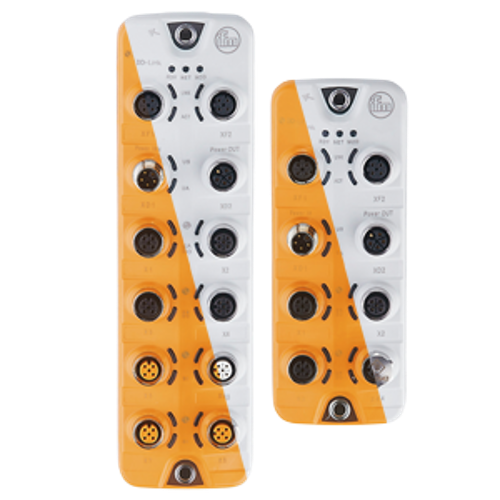 |
CabinetLine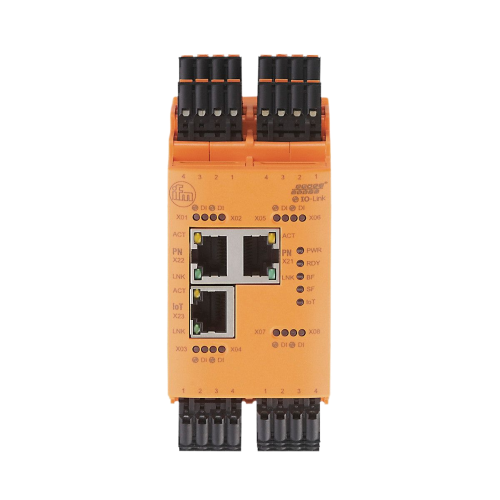 |
SolutionBlock |
|
|---|---|---|---|---|
| AL13xx | AL14xx | AL19xx | AL15xx | |
| Daisy chain |
|
|
|
|
| Power | M12 A-code 3.9 A (US) |
M12 L-code 16 A (US) 16 A (UA) |
Cage clamps 3.9 A (US) |
M12 L-code 16 A (US) 16 A (UA) |
| Fieldbus | PROFINET EtherNet/IP POWERLINK EtherCAT Modbus TCP |
PROFINET EtherNet/IP EtherCAT |
PROFINET EtherNet/IP POWERLINK EtherCAT Modbus TCP |
PROFINET EtherNet/IP |
| Multiprotocol |  |
|
|
 |
| IIoT Port | HTTP(S) JSON MQTT |
|
HTTP(S) JSON MQTT |
HTTP(S) JSON MQTT OPC UA |
| Output power | 300 mA | 2A | 300 mA | 4A |
| Current limitation | per master | per port (adjustable) | per master | pro Master US/UA |
| Current measurement | |
|
|
|
| Type 8-port master | 8x A-port | 4x B-port 4x A-port |
8x A-port | 4x B-port 4x A-port |
| Type 4-port master | 4x A-port | 4x B-port | |
|
| Protection rating | IP67 (orange) IP69K (grey) |
IP67 (orange) IP69K (grey) |
IP20 | IP67 (orange) IP69K (grey) |
What is the difference between the DataLine, PerformanceLine, CabinetLine, and SolutionBlock masters?
DataLine masters (AL13xx series)
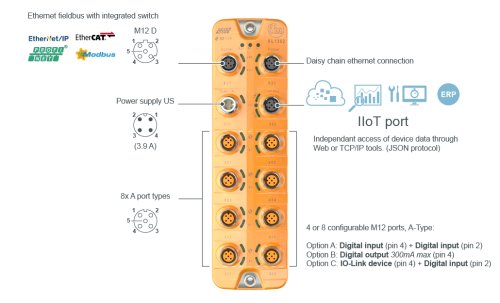
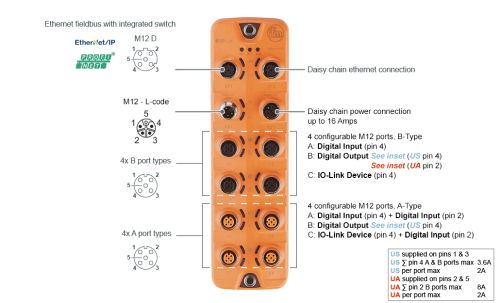
DataLine masters (AL13xx) are designed with an inexpensive M12 female connector to run power to the master. This series also offers a secondary IoT port so data can be sent directly to a high-level software system without the need for a PLC. This separates machine control and IT networks.
CabinetLine masters (AL19xx series)
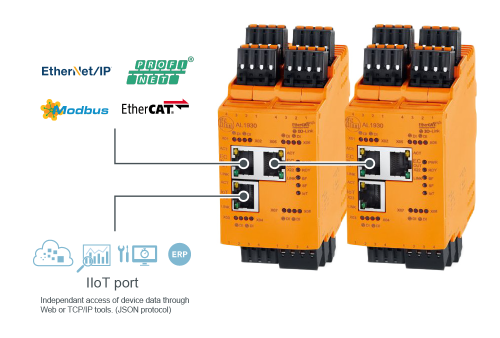
CabinetLine masters (AL19xx) are designed for use in main control panel with PLC (smaller systems) and/or in remote sub-panels (larger systems) with removable cage clamp connectors for easy wiring. This series also offers a secondary IoT port so data can be sent directly to a high-level software system without the need for a PLC. This separates machine control and IT networks.
IoT-core visualizer for SolutionBlock
The ifm SolutionBlock IO-Link master has its own webserver for master configuration. No need to download any software, simply enter the IP address of your master and you have access.
Within the IoT-core visualizer you can:
Integrated IODD interpreting with OPC UA support
In industrial environments, IO-Link sensors continuously generate critical data for automation systems. However, this data is transmitted as raw bytes, making it unreadable without manual conversion. This presents a major bottleneck, engineers and technicians must first decode these bytes into human-readable values before any meaningful analysis can occur. The result? Lost time, added complexity, and delayed decision-making.
The SolutionBlock IO-Link Master tackles the complexity of sensor data conversion with a built-in IODD interpreter and OPC UA server, enabling immediate, seamless translation of raw sensor data into structured, readable information—allowing you to focus on what matters most: real-time analysis, smarter automation, and enhanced operational efficiency.
How it works:
-
IODD upload: To interpret sensor values, the IODD (IO-Link Device Description) of each device must be uploaded to the system.
-
IODD list management: Once uploaded successfully, the IODD appears in a list at the bottom of the interface—providing a clear overview of all recognized devices.
-
Process data interpretation: With the IODD in place, head to the Process Data tab to view both the raw process values and their interpreted, human-readable equivalents.