- IO-Link — main page
- Device configuration
Configuring IO-Link devices with moneo configure free

moneo configure free is ifm’s free solution for configuring IO-Link products. With its intuitive user interface, this tool simplifies device configuration and significantly reduces machine commissioning times.

Ready to use instantly – wherever you are
- No installation required (provided PCAP is available)
- No login or licensing required
- Ideal for environments with strict IT policies and for minimal effort

Parameter setting for all IO-Link devices
- Automatic detection of all IO-Link devices connected in the network, as well as manufacturer-independent support in accordance with IO-Link specifications
- Configuration of and access to parameters for all IO-Link devices
- Read, write and modify device parameters online and offline

Visualisation
- Clear visualisation of process data on dashboards
- Quick display of real-time data from IO-Link sensors and devices
- Display of short-term trend curves

IODD management
- Display local and online IODD catalogues
- Updates
- Import IODD files

Bulk operations
- Simultaneous firmware updates for multiple ifm IoT and IO-Link devices
- Central security settings in a single step
- Significant time savings in large networks
Check and document the device status
IO-Link Device Verification allows you to check the current operating status of supported ifm sensors directly in moneo configure free. The software reads the device and diagnostic information, evaluates the device status and automatically generates a clear PDF report.
The report includes the device identification, a time stamp and the unambiguous verification result “Verification passed” or “Verification failed”.
This gives you consistent and traceable documentation of the device status in just a few steps, for example for quality assurance, maintenance and audit preparation.
Your advantages at a glance
- Direct verification: read the device status directly via IO-Link
- Clear result and documentation: clear “passed” or “failed” result in a PDF report including a time stamp and relevant identification data
- Available locally: save, print and archive PDF reports locally
- Included free of charge: part of moneo configure free for supported ifm sensors
This is how it works
- Connect the ifm IO-Link sensor via an IO-Link master or a USB adapter.
- Select the sensor in moneo configure free.
- Start IO-Link Device Verification.
- Check the result and save the generated PDF report locally.
Connecting devices to moneo configure free
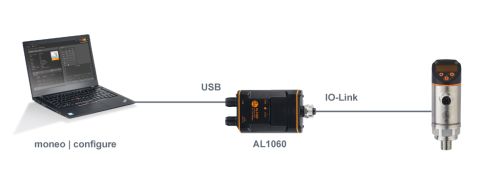
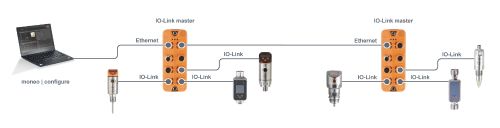
With moneo configure free, IO-Link devices can be configured via both USB and Ethernet. Both options are shown here.
Connection via USB IO-Link interface AL1060

Advantages
- Power supply of the sensors via USB (cable included with ZZ1060)
- Compact and easy to transport

Disadvantages
- Only one device can be connected at a time
Advantages
- Simultaneous connection to multiple masters and devices
- Device access without modifying / interrupting the existing communication with the PLC
Disadvantages
- A separate 24 V DC supply is required for the IO-Link master


